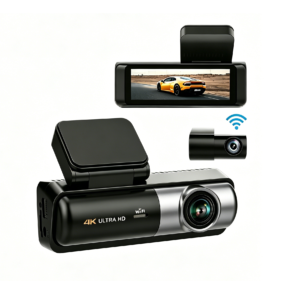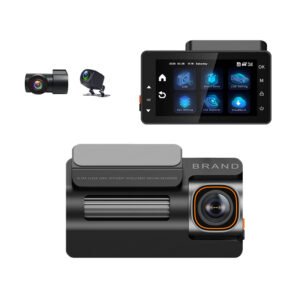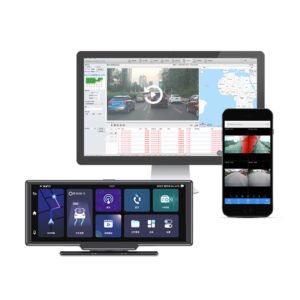
Most dash cams can record sound as well as video — but whether they do by default, whether you should leave it on, and whether it is even legal where you drive are questions a surprising number of buyers never think about until a passenger asks “is this thing recording me?” This guide explains how dash cam audio works, when it is useful, the privacy and consent rules around it, and how to set it up properly (especially for rideshare and fleet drivers). For placement and the broader legality of the camera itself, see our mounting & legal placement guide.
Do Dash Cams Record Audio?
Yes, most have a built-in microphone and record in-cabin sound along with the video, typically as an audio track in the same file. Common points:
- It’s usually on by default on many cameras — so your conversations, phone calls and passengers may be recorded unless you turn it off.
- It can almost always be disabled — a “record audio” / microphone toggle in the menu or app mutes it; some cameras have a quick physical or app button.
- The mic hears the cabin interior — your voice, passengers, radio — not (clearly) the outside world or other cars.
When Audio Is Useful — and When It Isn’t
- Useful for rideshare/taxi — audio can capture passenger disputes, verbal abuse, fare arguments or what was said during an incident (see our rideshare & taxi guide). 3-channel IR cameras that record the cabin pair naturally with this.
- Useful at the scene — spoken reactions, sirens, horn and impact sounds can add context to a clip.
- Often not needed for everyday private use — for pure road-evidence purposes, video (with GPS/time) is what matters; many drivers simply mute the mic to keep conversations private and avoid recording family/friends.
The Privacy and Consent Issue
This is the important part. Recording video of the public road is broadly legal nearly everywhere; recording the voices of identifiable people inside a private space is treated more strictly. Rules vary by country and US state:
- One-party consent (many US states and countries): you, as a participant in the conversation/owner of the car, can record without everyone’s explicit consent.
- Two-party / all-party consent (some US states and certain countries): everyone being recorded must consent. In these places, recording passengers or even a passenger’s conversation without telling them can be illegal or make the audio inadmissible.
- Rideshare/fleet rules — Uber, Lyft and many fleet/insurance programs have their own policies: some require or strongly recommend notifying passengers (a sticker/sign or in-app disclosure), and some jurisdictions mandate a visible notice for in-car recording.
Safe practice almost everywhere: if you carry passengers or drive for work, post a clear “audio/video recording in progress” notice in the cabin and/or tell passengers — or simply turn audio off if you don’t need it. Video-only recording with a notice covers you in the vast majority of situations. This overlaps with the windshield/placement legality covered in the mounting guide.
For Fleet and Commercial Operators
- Disclose to drivers — tell employees the vehicle records video (and whether audio), and why (safety, training, claim protection). This is standard and often a legal requirement; it also builds trust.
- Manage audio centrally — connected 4G fleet DVRs let an administrator set audio on/off policy across vehicles rather than relying on each driver. Units like the 4G triple-channel DVR and YC06 4-channel support managed configurations — see the fleet dash cam guide and business buying guide.
- Keep data handling tight — treat cabin recordings as personal data; control who can access clips and how long they’re kept.
Quick Audio Checklist
- ✅ Check whether your camera records audio by default; know where the mic toggle is.
- ✅ Private use — mute if you don’t want conversations recorded.
- ✅ Rideshare/taxi/fleet — post a recording notice, tell passengers, and check local two-party-consent law.
- ✅ Fleets — set a written audio policy, disclose to drivers, manage centrally via 4G units.
- ✅ For evidence, the video with accurate time/GPS is the key part (see using footage in a claim); audio is optional.
The Short Version
Yes, most dash cams record in-cabin audio via a built-in mic, often enabled by default — and you can (and sometimes should) turn it off. The road video is what protects you in a claim; audio is mainly valuable for rideshare/fleet dispute evidence. Because recording people’s voices inside a car is treated more strictly than filming the public road, post a recording notice and/or get consent — especially in two-party-consent regions and when carrying paying passengers — or simply disable the mic. Models with a cabin camera and controllable audio, like the triple-channel YS15 or centrally-managed 4G fleet DVR, make it easy to set the policy that fits your use. Add this to your buying checklist.
Dash Cams With Controllable Audio & Cabin Recording — Driver, Fleet and Wholesale Pricing
Yeshi Tech supplies dash cams with toggleable in-cabin audio, IR cabin cameras, clear privacy controls and fleet-managed settings — for drivers, rideshare operators, fleets, distributors and OEM partners. Tell us your market and quantities — quote within 24 hours.
Email: sales01@yeshi3c.com
WhatsApp: +86 134 2511 8418
Address: Room 1006, Xianke Industry Building, Bagua 4th Rd, Futian District, Shenzhen, 518029, China