A dash cam earns its price the moment there is a crash — but only if you handle the footage correctly in the minutes and days after. Insurers increasingly accept and even expect dash cam video, and clear, date-stamped footage can settle a disputed claim in days instead of months, protect you from false liability, and even lower premiums. This guide walks through exactly how to preserve, export and submit dash cam footage for an insurance claim, what makes it admissible, and the mistakes that can ruin your evidence. First, make sure your camera is set up to capture usable evidence — see our dash cam buying guide.
Why Insurers Value Dash Cam Footage
- Cuts through he-said-she-said. Video shows what actually happened — who ran the light, who changed lanes, who rear-ended whom.
- Speeds up claims. Clear evidence reduces investigation time and disputes; many insurers have a dedicated dash cam submission process.
- Protects against fraud and false claims. Staged accidents and “crash for cash” scams collapse on video.
- Can lower premiums. Some insurers offer discounts for fitted dash cams (ask your provider).
At the Scene: Preserve the Clip Immediately
- Lock the clip right away. If the G-sensor didn’t auto-lock the incident, press the emergency/manual lock button before you do anything else. This stops loop recording overwriting it (why this matters: how long footage is kept).
- Do not keep driving on the same card if the incident is serious — normal recording can eventually roll over even nearby clips. When safe, remove the microSD card or download the clip via the app.
- Capture the context. Film the scene, vehicle positions, damage, number plates and road signs on your phone too — it complements the dash cam clip.
- Note the time and location — GPS-equipped cameras stamp this automatically (what GPS adds).
Exporting the Footage Correctly
- Copy the original file off the memory card to a phone/PC/cloud — do not edit, trim, re-compress or add filters to the version you submit. Original, unaltered files carry the embedded timestamp and metadata that insurers/courts rely on.
- Keep the whole clip including several seconds before and after the impact (event-locked clips usually do this automatically) — the lead-up shows who did what.
- Save a backup copy in a second location (cloud, another drive).
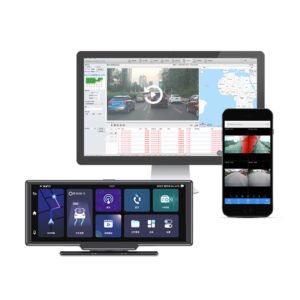
- If your camera uploads to the cloud (4G models), download the incident clip from the portal — it is already date-stamped and tamper-evident, which is especially useful for fleets.
What Makes Footage Admissible and Credible
| Factor | Why it matters |
|---|---|
| Clear, accurate date & time | Syncs the video to the incident; set the clock (or use GPS auto-time) |
| Legible image (plate/lane) | Enough resolution + good night vision to show detail — a blurry clip helps no one |
| Unaltered original file | Editing undermines credibility; keep metadata intact |
| Lawful placement/recording | Camera not obstructing your view; audio consent rules respected (mounting & legality) |
| Speed/location data (GPS) | Corroborates your account; hard to dispute |
Submitting to the Insurer
- Report the claim as normal and tell them you have dash cam footage up front.
- Submit through their preferred channel — many have an upload portal, app or email for dash cam video; attach the original file.
- Include a short factual note: date, time, location and what the footage shows (stick to facts, no opinions/arguments).
- For fleet/company vehicles, send the clip through your telematics/cloud platform and log it — connected 4G cameras make this retrievable from the office even if the driver is unavailable (see fleet dash cam guide and business buying guide).
Can Footage Ever Be Used Against You?
Honestly, yes — if you were at fault or speeding, the footage shows that too. That is actually a reason to use it: courts and insurers generally view voluntarily produced, truthful evidence favourably, and trying to hide or delete footage looks far worse. The footage’s job is to establish the truth, which overwhelmingly protects the driver who did nothing wrong. Just drive as if the camera is always watching — because it is, and that is the point.
The Short Version
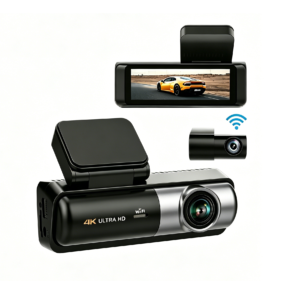
After a crash: lock the clip immediately, stop recording on that card if it’s serious, copy the original unedited file (with lead-up and metadata), back it up, and submit it through your insurer’s dash cam channel with a short factual note. Footage is strongest when it is clear, correctly date/time-stamped (GPS helps), lawfully recorded and unaltered. A camera built for evidence — good resolution, night vision, GPS stamping and reliable event locking, like the YS15, or a cloud-connected 4G fleet DVR for business — turns a disputed claim into an open-and-shut one. Use a reliable high-endurance card (memory card guide) so the footage is actually there when you need it.
Dash Cams That Protect You in a Claim — Driver, Fleet and Wholesale Pricing
Yeshi Tech supplies 4K dash cams with GPS speed/location stamping, G-sensor event locking and 4G cloud backup so your incident footage is date-stamped, tamper-evident and ready for insurers — for drivers, fleets, distributors and OEM partners. Tell us your market and quantities — quote within 24 hours.
Email: sales01@yeshi3c.com
WhatsApp: +86 134 2511 8418
Address: Room 1006, Xianke Industry Building, Bagua 4th Rd, Futian District, Shenzhen, 518029, China