Many dash cams list “GPS” as a feature, and a lot of buyers aren’t sure what it actually does or whether they need it. GPS in a dash cam is not about navigation — the camera is not a sat-nav. It is about stamping your footage with objective, verifiable data: where you were, how fast you were going, and exactly when it happened. That turns a video from “he-said-she-said” into hard evidence. Here is what GPS adds, when it matters most, and whether it is worth paying for. For the full feature checklist, see our dash cam buying guide.
What GPS Actually Does in a Dash Cam
- Speed overlay. The camera receives speed from satellite signals and burns it onto the video. Every clip shows your speed — proof you were (or were not) speeding, and an instant credibility check on your account of events.
- Route and position tracking. It logs your GPS coordinates and heading, so playback shows your exact path on a map — which road, which lane, which direction.
- Accurate time and date stamp. GPS sets the clock automatically and precisely (no more blinking 12:00 or a manually-set wrong date), so footage is timestamped reliably for insurance or court.
- Location-based data. Some models log g-force/impact events with a location, and parking events show where the car was when bumped.
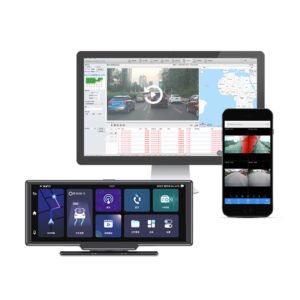
All of this is written into the clip or a companion log file, viewable in the camera’s app or desktop player with map and speed gauges.
Why It Matters: Evidence and Credibility
After a collision, the question is rarely just “who hit whom” — it is “how fast was everyone going, and exactly where and when did it happen?” GPS data answers these objectively:
- Disputes over speed — if another driver claims you were speeding, a GPS log showing your actual speed protects you; conversely it keeps everyone honest.
- Insurance and liability claims — a clip with verified time, location and speed is far harder to dispute than video alone, which speeds up claims and reduces fraud exposure.
- Fleet driver protection — telematics-style data proves a professional driver was following the route and speed limits, shielding the company from false claims. This is core to how fleet dash cams help operators.
Built-in GPS vs External GPS Antenna
- Built-in GPS — the receiver is inside the camera or mount; nothing extra to install. Convenient, common on modern units like the YS15.
- External GPS antenna — a small separate module (often placed on the dash or near the windscreen) for a stronger satellite lock, useful on heavily tinted/coated windscreens that shield the signal. Many cameras accept one optionally.
Either way, a satellite lock takes a few moments after start-up (like a phone’s GPS); the speed/route data appears once locked.
GPS + 4G = Live Fleet Tracking
For a private driver, onboard GPS logging is usually enough. For fleets, combining GPS with a 4G-connected camera turns it into a live telematics tool: real-time vehicle location on a map, route history, geofencing, speed-event alerts and automatic cloud upload of incident clips with location attached. That is the backbone of modern fleet management — see how 4G dash cams work and the Wi-Fi vs 4G comparison. Connected units like the 2K triple-channel 4G fleet DVR and the YC06 4-channel 4G camera pair GPS tracking with cloud playback; for broader operator decisions see our fleet/business buying guide.
GPS Often Works Alongside Other “Smart” Features
- ADAS / DMS — advanced driver-assistance and driver-monitoring alerts (lane departure, forward collision, fatigue) are most useful with GPS speed/context; our ADAS & DMS explainer covers these.
- Night vision is independent of GPS but just as important for usable footage after dark (night vision guide).
Do You Need GPS?
| Your situation | GPS recommended? |
|---|---|
| Everyday private driver, budget-focused | Nice to have; not essential — basic video still covers most incidents |
| Commuter, family car, want maximum claim protection | Recommended — speed/time/location strengthens any claim |
| Rideshare / taxi / professional driver | Strongly recommended — protects against false allegations and speed disputes |
| Fleet / commercial operator | Essential — choose 4G + GPS for live tracking, route history and geofencing |
A Note on Privacy
GPS logs location, so be transparent: fleet operators should tell drivers the vehicle is tracked with GPS (and that the data is used for safety, routing and claim protection) — this is standard and in many regions a disclosure requirement. In private cars it is your own data. Location data also stays with you unless you use a 4G cloud service, in which case it sits in your fleet account.
The Short Version
GPS in a dash cam stamps your video with speed, route/location and an accurate time and date, turning footage into objective, hard-to-dispute evidence for insurance and liability. It is not navigation. For most family and professional drivers it is a worthwhile upgrade; for fleets it is essential — and pairing it with 4G gives live vehicle tracking and cloud evidence. Many Yeshi Tech models include GPS, from consumer units like the YS15 and dual-channel YS14 to connected fleet DVRs like the 4G triple-channel and YC06.
GPS-Equipped Dash Cams — Driver, Fleet and Wholesale Pricing
Yeshi Tech supplies GPS-equipped 4K dash cams and 4G connected fleet DVRs with route tracking, speed logging and cloud playback — for drivers, fleets, distributors and OEM partners. Built-in GPS, external GPS antennas and full telematics options available. Tell us your market and quantities — quote within 24 hours.
Email: sales01@yeshi3c.com
WhatsApp: +86 134 2511 8418
Address: Room 1006, Xianke Industry Building, Bagua 4th Rd, Futian District, Shenzhen, 518029, China