
A dash cam is one of the cheapest pieces of insurance you can buy for a vehicle — but only if it actually captures usable footage when something happens. A blurry, heat-dead, or wrongly-mounted camera is worse than none, because it gives you false confidence. After years of building and supplying dash cams to distributors and fleets on four continents, we see the same buying mistakes over and over. This checklist covers the ten things that actually matter, in order of importance.
1. Video Quality: Resolution, Sensor and Night Vision
The whole point of a dash cam is evidence: license plates, traffic lights, road signs, and what the other driver did. 1080p is the bare minimum; 4K front cameras make a real difference when you need to read a plate one or two cars ahead, especially in rain or at night. But resolution alone is not enough — look for a quality sensor (Sony sensors are the industry benchmark), a glass lens, and WDR/HDR to balance bright headlights against dark roads. Cheap “4K” cams with no-name sensors look worse than good 1080p ones after dark. We break this down in our 1080p vs 2K vs 4K resolution guide.
2. Channels: How Many Cameras Do You Actually Need?
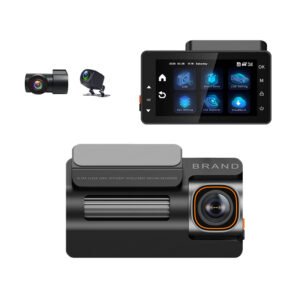
One camera covers the road ahead; two add the rear; three add the cabin; four can cover both sides or a trailer. Rideshare and taxi drivers should go straight to a 3-channel setup with an IR night-vision cabin camera for interior disputes. Fleet and logistics buyers increasingly spec 3–4 channels. Personal drivers usually want front + rear. Our dash cam channels guide matches 1CH/2CH/3CH/4CH to use cases.
3. Heat Reliability: Supercapacitor Beats Battery
A dash cam sits behind the windshield, where interior temperatures can hit 80°C+ in summer. Lithium batteries swell and die in that heat — sometimes within a year. Supercapacitor models handle -20°C to 70°C+ without degradation and are the only sensible choice for hot climates and vehicles parked outdoors. Details here: supercapacitor vs lithium battery in dash cams.
4. Storage: Use a High-Endurance microSD Card
Dash cams overwrite footage 24/7 — that is the harshest workload an SD card can have. A generic card will corrupt or die within months, taking your evidence with it. Spec a high-endurance card rated for continuous recording (Class 10/U3, 64–256GB), buy from an authorized channel (fake cards are rampant), and expect it to be a consumable. See our microSD card buyer’s guide for dash cams.
5. Loop Recording, G-Sensor and Parking Mode
These three features decide whether the camera “just works”: loop recording overwrites the oldest clips automatically; the G-sensor locks footage on impact so it cannot be overwritten; parking mode records bumps while you are away — but it usually needs a hardwire kit or OBD power cable, since the cigarette socket dies with the engine. Full explanation in our loop recording, G-sensor and parking mode guide.
6. Discreet Design and Mounting
A camera hanging off a suction cup in the middle of the windshield looks bad, vibrates, and tempts thieves. Prefer compact, wedge-shaped units that tuck behind the rear-view mirror with 3M adhesive mounts, and check the viewing angle (130°–170° is the sweet spot) — wider distorts plates, narrower misses lanes.
7. Screen vs Screenless, and App Workflow
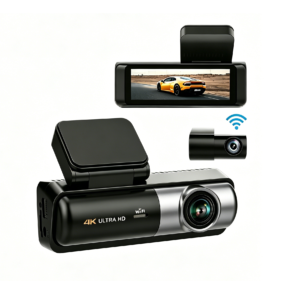
A built-in screen makes setup and on-the-spot playback easy; screenless Wi-Fi models are more discreet and pair with your phone for preview and download. Wi-Fi (5GHz/5.8G is noticeably better than 2.4GHz for video transfer) is worth paying for if you will ever pull clips yourself. GPS stamps speed and location — useful evidence, and standard on mid-range-and-up models.
8. Advanced Safety: ADAS, DMS and 4G for Fleets
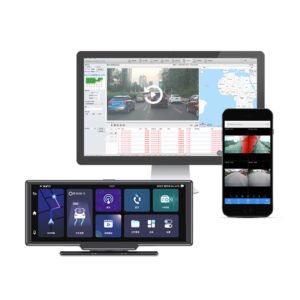
For personal and rideshare use, ADAS (lane-departure and forward-collision warnings) is a nice bonus. For fleets, the real step up is 4G cloud connectivity — live streaming, remote GPS tracking, driver-behavior scoring, and DMS fatigue/smoking/phone-use alerts on a CMSV6-style platform. These are not luxuries; they cut accident and insurance costs measurably.
9. Certifications, Warranty and the Supplier Behind It
If the camera will be resold or deployed commercially, require CE, FCC, RoHS (and UKCA for Britain) paperwork, a written warranty of at least 12 months with a real RMA process, and a supplier that does OEM/private label (logo, packaging, firmware, startup screen) at a sensible MOQ. A $5 no-name unit with no support is a false economy when you are deploying hundreds.
10. Easy Installation and Support Material
Rear-camera wiring and hardwire kits are where DIY installs go wrong. Check the mount type, cable length, and whether the supplier provides clear instructions. Our front & rear camera installation guide walks through the whole process.
Quick Recommendation Map
- Budget / personal: YS01 2K dual dash cam — front and rear coverage at the lowest entry price.
- Rideshare / taxi: YS02 with enhanced night vision, or step up to the YS15 4K triple channel with Sony IMX675 and IR cabin camera.
- Premium personal: YS16 true front & rear 4K with reverse camera, or the YS14 4K+1080P with 3.16″ IPS screen and 5.8G Wi-Fi.
- Maximum cabin coverage: YS13 4K triple channel — front, rear and interior.
- Discreet corporate/fleet monitoring: YS03 compact 4K with GPS.
- Fleet / logistics with live monitoring: YC06 4G 4-channel fleet dash cam with CMSV6 and optional ADAS/DMS.
The Bottom Line
If you remember nothing else: prioritize a quality sensor with good night footage, supercapacitor heat resistance, a high-endurance SD card, and the right number of channels for your use case — then buy from a supplier that will still answer the phone in 12 months. That short list prevents 95% of the dash cam regrets we hear about.
Buying in Bulk? Get Wholesale Pricing & Samples
Yeshi Tech is a Shenzhen-based dash cam manufacturer supplying distributors, fleet operators, rideshare companies and private-label brands worldwide. Tell us your target quantity, destination market and any OEM requirements — we will reply with a tailored quote within 24 hours.
Email: sales01@yeshi3c.com
WhatsApp: +86 134 2511 8418
Address: Room 1006, Xianke Industry Building, Bagua 4th Rd, Futian District, Shenzhen, 518029, China
[…] Here is a mistake that quietly ruins dash cams: someone buys a good camera, pops in a cheap or too-small memory card, and assumes they are protected — until the day they need footage and find the card corrupted, full, or overwritten. The memory card is the part that actually stores your evidence, and choosing the wrong size or type is the most common reason a dash cam “didn’t record.” This guide covers what size card you need, what kind of card, and how dash cam storage actually works. For the full feature checklist, start with our dash cam buying guide. […]
[…] “If I leave a dash cam plugged in, will my car not start in the morning?” It is one of the most common questions buyers ask — and the short answer is: a properly installed dash cam will not drain a healthy car battery. The camera uses very little power while driving, and the risk only appears when you run it while parked. Even then, the problem is solved with the right wiring and a simple safety cutoff. Here is exactly how dash cam power works, when battery drain is a real risk, and how to set it up so you never get stranded. For the full feature checklist, see our dash cam buying guide. […]
[…] It is the first real choice after you decide to buy a dash cam: one camera facing forward, or a second one covering the rear? A front-only camera is cheaper and simpler; a front-and-rear (dual-channel) setup costs a little more and adds a wire to the back of the car — but it covers the collisions that a forward camera completely misses. This guide lays out exactly what each setup does, who needs the rear lens, and how it extends to 3- and 4-channel systems. For the full feature checklist, see our dash cam buying guide. […]
[…] Many dash cams list “GPS” as a feature, and a lot of buyers aren’t sure what it actually does or whether they need it. GPS in a dash cam is not about navigation — the camera is not a sat-nav. It is about stamping your footage with objective, verifiable data: where you were, how fast you were going, and exactly when it happened. That turns a video from “he-said-she-said” into hard evidence. Here is what GPS adds, when it matters most, and whether it is worth paying for. For the full feature checklist, see our dash cam buying guide. […]
[…] A dash cam only helps if it is mounted in the right place — high enough to see the road, low enough not to block your view, and positioned so it is legal in your region. Mount it badly and you get glare, blocked vision, shaky footage or, in some places, a fine. The good news: there is a near-universal “correct” spot, and the legality rules are simple once you know them. Here is where to mount a dash cam, how to run the cable, and what the law says. For choosing the camera itself, see our dash cam buying guide. […]
[…] Beyond resolution and channels, there is a form-factor choice that splits the dash cam market: the standard “wedge” camera that sticks to the windshield behind the mirror, versus the mirror dash cam that straps over (or replaces) your rear-view mirror and doubles as a large screen. Each has real advantages and drawbacks around visibility, discretion, installation and what you actually see while driving. Here is an honest comparison to help you pick. For the broader feature checklist, start with our dash cam buying guide. […]
[…] A dash cam earns its price the moment there is a crash — but only if you handle the footage correctly in the minutes and days after. Insurers increasingly accept and even expect dash cam video, and clear, date-stamped footage can settle a disputed claim in days instead of months, protect you from false liability, and even lower premiums. This guide walks through exactly how to preserve, export and submit dash cam footage for an insurance claim, what makes it admissible, and the mistakes that can ruin your evidence. First, make sure your camera is set up to capture usable evidence — see our dash cam buying guide. […]
[…] isn’t), and how wholesale/fleet/OEM pricing works for business buyers. Use it alongside our dash cam buying guide so you pay for features you’ll […]